
The short form still creates permanent account settings. AUD is not normally changeable after sign-up, and personal details must later agree with verification evidence. Reading the privacy policy, conditions, bonus rules and local regulatory position before submission avoids treating registration as a purely technical step.
Lukki Casino welcome packageUp to A$4,000 + 300 free spins · 18+ · Terms apply
Go to LukkiLukki sign-up requirements
Each field supports either account access, cashier configuration or future identity checks. Only one account is allowed per person.
| Registration field | Requirement | Why it matters |
|---|---|---|
| Required | Becomes the login and recovery identifier | |
| Password | Required and case-sensitive | Protects the account; a visibility control helps inspect typing |
| Country | Australia | Sets the Australian account context |
| Currency | AUD | Controls the displayed fiat cashier limits |
| Date of birth | Separate day, month and year fields | Supports age and identity checks |
| Mobile | Australian number with +61 | Creates the account contact route |
| Age declaration | Mandatory 18+ checkbox | Registration is restricted to adults |
| Terms | Privacy Policy and Terms and Conditions accepted | Defines the account agreement |
| Documents | Not uploaded at sign-up | Verification occurs separately |
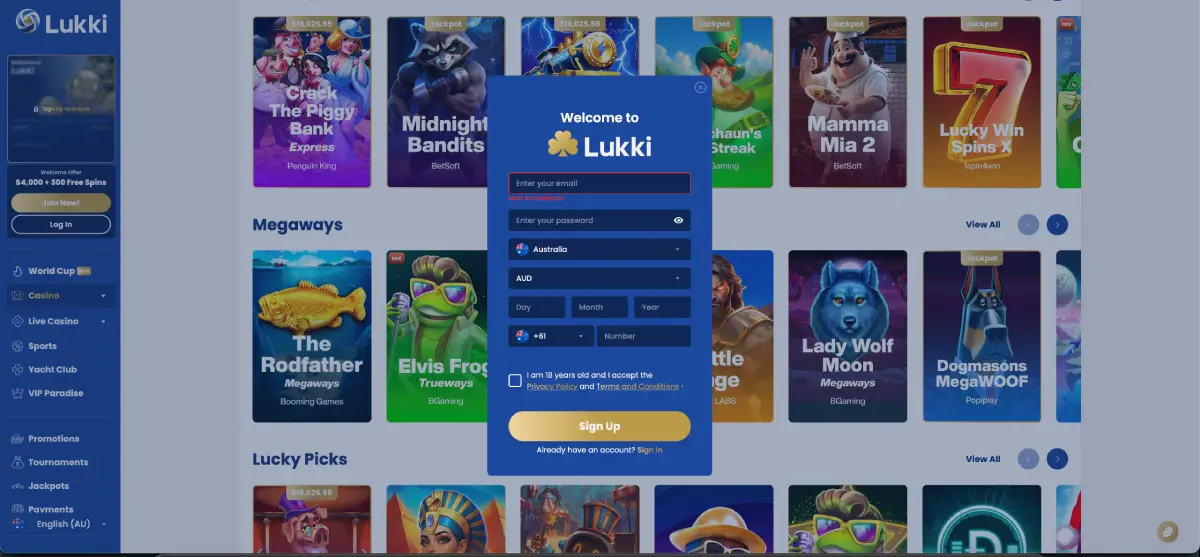
Creating a Lukki account step by step
Complete the form carefully rather than relying on later corrections. The sportsbook and casino controls open the same account process.
- Open the known Australian Lukki address in a current browser.
- Select Join Now in the casino or Sign up in sports.
- Provide an email address that remains under personal control.
- Create a unique password and use the visibility control to inspect it.
- Choose Australia as the country.
- Ensure that the account currency shows AUD.
- Enter the correct day, month and year of birth.
- Add a mobile number with the +61 prefix.
- Read the linked policies, then tick the 18+ and terms checkbox.
- Submit once and wait for the personal account panel to load.
A returning user should switch to the Lukki login rather than submit another profile. Password recovery and chat support are the proper routes when an existing email is recognised.
Why AUD should be confirmed before submission
The selected currency determines the fiat limits displayed in Payments and is not ordinarily changed later. Australia can preselect AUD, but the field deserves an explicit review before the form closes.
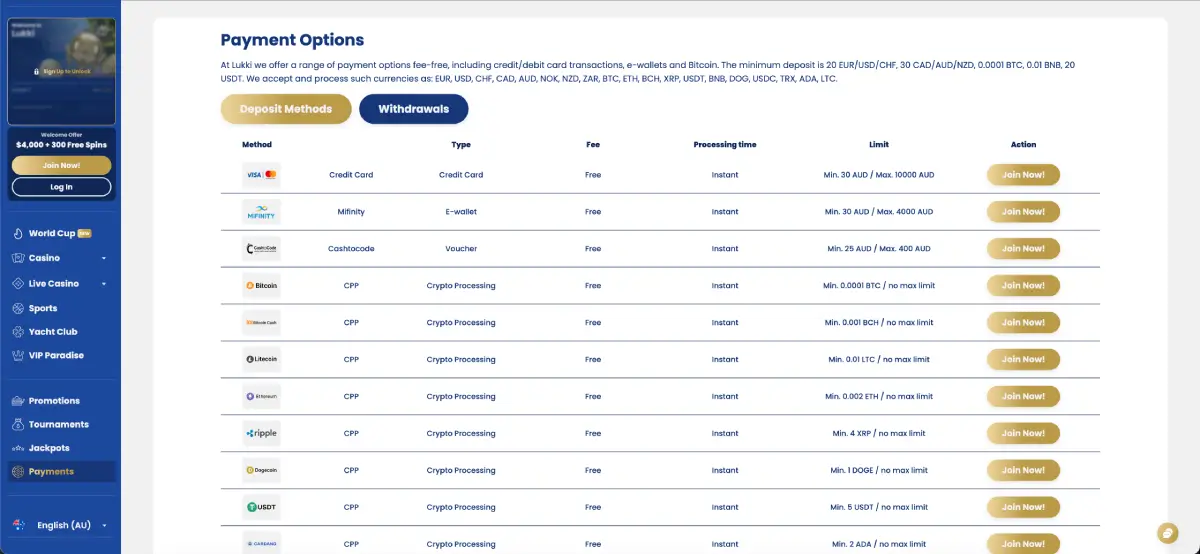
| AUD method | Use | Listed range |
|---|---|---|
| Visa or Mastercard | Deposit | AUD 30–10,000 |
| Mifinity | Deposit and withdrawal | AUD 30–4,000 |
| Cashtocode | Deposit | AUD 25–400 |
| Inpay or PayAnyBank | Withdrawal | AUD 300–6,000 |
Lukki also lists EUR, USD, CHF, CAD, NOK, NZD, ZAR and cryptocurrencies. Choosing another currency changes the account context and may introduce conversion considerations for an Australian payment source. If the wrong currency appears after creation, contact chat before depositing.
Setting limits at sign-up
A useful registration plan includes boundaries before the cashier becomes accessible. Promotional stages and loyalty progress can otherwise turn one intended deposit into an open-ended sequence.
- Choose a maximum deposit amount for the initial session.
- Set a separate loss boundary below available disposable funds.
- Decide the maximum time allowed for casino or sports use.
- Do not treat later welcome stages as required purchases.
- Avoid registering when chasing a loss at another operator.
- Use account controls and banking blocks where appropriate.
Limits should be based on personal affordability, not the AUD 500 bonus ceiling or the next Yacht Club threshold. Anyone already using BetStop should not create the account, since Lukki is not connected to that register.
Activating the first-deposit offer
The standard opening bonus matches 100% of an eligible deposit, capped at AUD 500, and adds 100 free spins. It does not use a promo code. This reward begins with payment, not with registration alone.
- Open Promotions after the account panel appears.
- Compare the standard offer with the alternative VIP first-deposit route.
- Read wagering, game contribution, maximum stake and expiry.
- Open Payments and choose an eligible method.
- Enter at least AUD 30 for card or Mifinity, or AUD 25 for Cashtocode.
- Review the expected bonus selection before paying.
- Make sure the account credit appears before starting game rounds.
The VIP alternative lists 150% extra, a trial and 10% cashback from an AUD 500 deposit. It should be compared before the first transaction because it can change the standard route. The Lukki bonus guide explains both choices, and the code guide covers LUKKI2, LUKKI3 and LUKKI4 for later deposits.
Verification after Lukki registration
No document is required inside the sign-up modal. KYC is handled later and commonly precedes the first withdrawal. It can cover identity, address and ownership of the payment method.
| Review item | Typical evidence described by the account process | Registration detail to match |
|---|---|---|
| Identity | Valid government photo document | Name and birth date |
| Address | Bank statement or utility document | Registered address |
| Payment ownership | Card or e-wallet confirmation where requested | Verified account holder |
Files should be readable, complete and submitted only through the designated secured route. An informal name, incorrect birth-date digit or third-party payment method can create inconsistencies when a withdrawal is reviewed. Accounts are personal and should not be operated for someone else.
The Lukki withdrawal guide places KYC beside the payout limits for Mifinity, bank transfer and cryptocurrencies. Verification does not turn a deposit-only method into a withdrawal route.
Common registration mistakes and fixes
Most sign-up issues can be resolved before submission. The exception is a locked-in currency or duplicated profile, which requires support rather than another attempt.
| Problem | Response |
|---|---|
| Form will not submit | Review every required field and the age-and-terms checkbox |
| Email already recognised | Use password recovery instead of creating a duplicate |
| Mobile rejected | Review the +61 prefix and number formatting |
| Wrong currency selected | Stop before payment and ask chat to review the account |
| Confirmation absent | Inspect filtered folders and compare the typed email |
| Modal behaves incorrectly | Try a current browser and review script-blocking extensions |
| Details do not match documents | Contact support before submitting KYC or depositing |
A browser issue does not justify installing an application. Lukki operates on the web, and the mobile guide covers supported phone access and safe home-screen shortcuts.
Account checklist before the first payment
The profile is ready for funding only when its personal, regulatory and financial settings have been reviewed together.
- Australia and AUD are displayed correctly.
- The email and +61 mobile details are accessible.
- Name and date of birth match identity evidence.
- A unique password protects the profile.
- The chosen payment method has a suitable withdrawal plan.
- Any welcome offer conditions fit the intended games and budget.
- Deposit, loss and time limits are already decided.
The main Lukki Casino overview provides the necessary context on games, sports, regulation and support. Registration should follow that assessment rather than precede it.
Australian registration takes place without a local Lukki licence or BetStop participation. Sign-up is restricted to people aged 18 or older, and a false age declaration can later conflict with verification. Do not register to bypass a self-exclusion. Use the responsible gambling resources or contact Gambling Help Online for confidential assistance.
Lukki Casino registration FAQ
These answers cover account creation, currency, verification and the first bonus decision.
How does Lukki Casino registration work?
Open Join Now or Sign up, then provide an email, password, Australia, AUD, birth date and +61 mobile number. Accept the 18+ declaration and linked account terms before submitting.
Are documents required during sign-up?
No. Verification is a separate process, usually associated with the first withdrawal. Personal and payment details should still be entered accurately so they can match later evidence.
Can the account currency be changed later?
AUD is set during registration and is not normally changeable afterwards. Inspect the field before submission and contact support before any payment if it is wrong.
What is the minimum registration age?
The minimum age is 18, confirmed through a mandatory checkbox. The birth date can later be compared with identity documentation during KYC.
Does registration itself award a bonus?
No registration-only offer is published. The standard reward begins with an eligible first deposit and matches it at 100% up to an AUD 500 ceiling with 100 spins.
Is a code needed for the first bonus?
No. Code entry starts with the second welcome deposit. First-stage activation depends on eligibility, payment and the attached conditions rather than a string.
Can two Lukki accounts be opened?
No. The limit is one account per person. Recover an existing profile through the login panel or ask chat for help instead of registering another email.
What should be done if the wrong details were entered?
Contact Lukki chat before depositing or uploading documents. Do not create a duplicate account, and keep a record of any correction instructions given by support.
Note. Lukki Casino is not licensed in Australia and is not covered by BetStop. Offers and limits can change; the casino's terms apply. 18+.